Transport Management System ERP in Mumbai
Manage transporter rate cards, vehicle trips, dispatch documents, e-Way Bill Part-B updates, LR generation, POD tracking, freight billing and transporter reconciliation in one connected ERP system.

Freight Control Should Not Depend on Spreadsheets
Many businesses negotiate freight rates properly, but daily transport execution still happens through Excel files, emails, manual calculations and phone follow-ups. T3 ERP TMS connects rate cards, trip planning, dispatch documents, POD tracking and transporter bill matching in one process.
Rate Card Control
Rates are negotiated once but not always checked during trip planning. TMS applies approved transporter, lane and vehicle-wise rates automatically.
Repeated Dispatch Entry
Vehicle details, e-Way Bill Part-B updates and LR details are often entered separately. TMS uses the same trip data to reduce repeated work.
POD and Bill Verification
PODs, shortage details and transporter bills are difficult to verify when records are separate. TMS keeps delivery proof, freight and bill matching connected.
From Load Planning to Freight Settlement
T3 ERP TMS connects transport planning, dispatch, delivery proof and transporter billing in one flow. Create a trip, add invoices, calculate freight, update compliance details, generate LR, close delivery with POD and match transporter bills with system-calculated freight.

Set Up Transport Data
Create transporters, vehicles, drivers, lanes, locations and approved rate cards before daily trip planning starts.
Build a Trip
Select ready dispatches or invoices and group them into one vehicle movement with proper load-sheet details.
Calculate Freight
Freight is calculated using transporter, lane, vehicle type and surcharge rules before dispatch is confirmed.
Dispatch the Vehicle
Update e-Way Bill Part-B vehicle details and generate LR or consignment-note documents from the same trip data.
Close Delivery
Capture POD and record shortage, damage or delivery confirmation where required before freight approval.
Match Transporter Bill
Compare transporter invoice value with system-calculated freight before approval, purchase invoice posting and payment.
Plan Vehicle Movement With the Right Rate and Documents
Create transport trips with accurate freight cost before the truck leaves the gate. Rate cards, trip/load sheets, e-Way Bill Part-B updates and LR generation stay connected in one process.
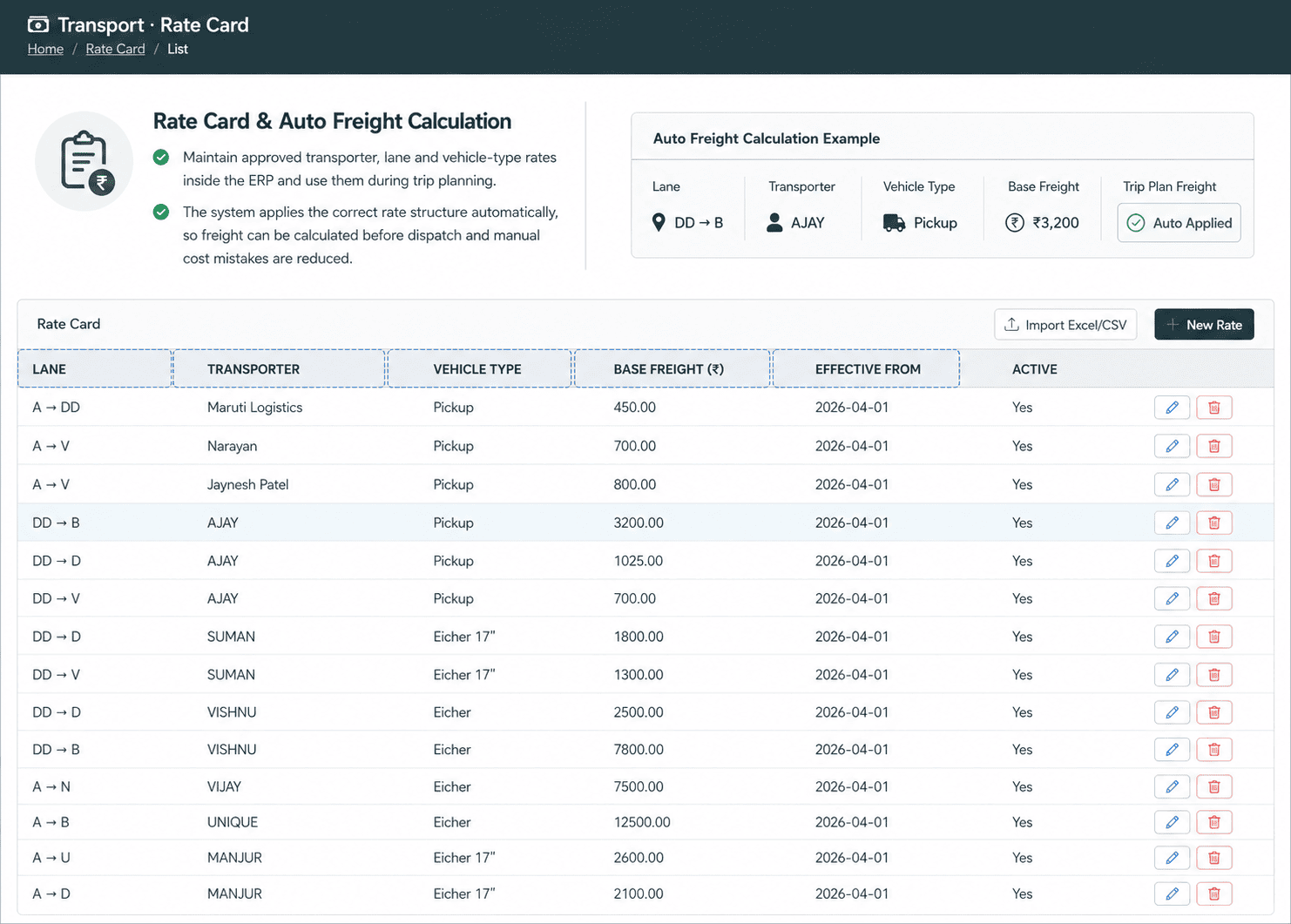
Rate Card & Auto Freight Calculation
Maintain approved transporter, lane and vehicle-type rates inside the ERP and use them during trip planning.
The system applies the correct rate structure automatically, so freight can be calculated before dispatch and manual cost mistakes are reduced.
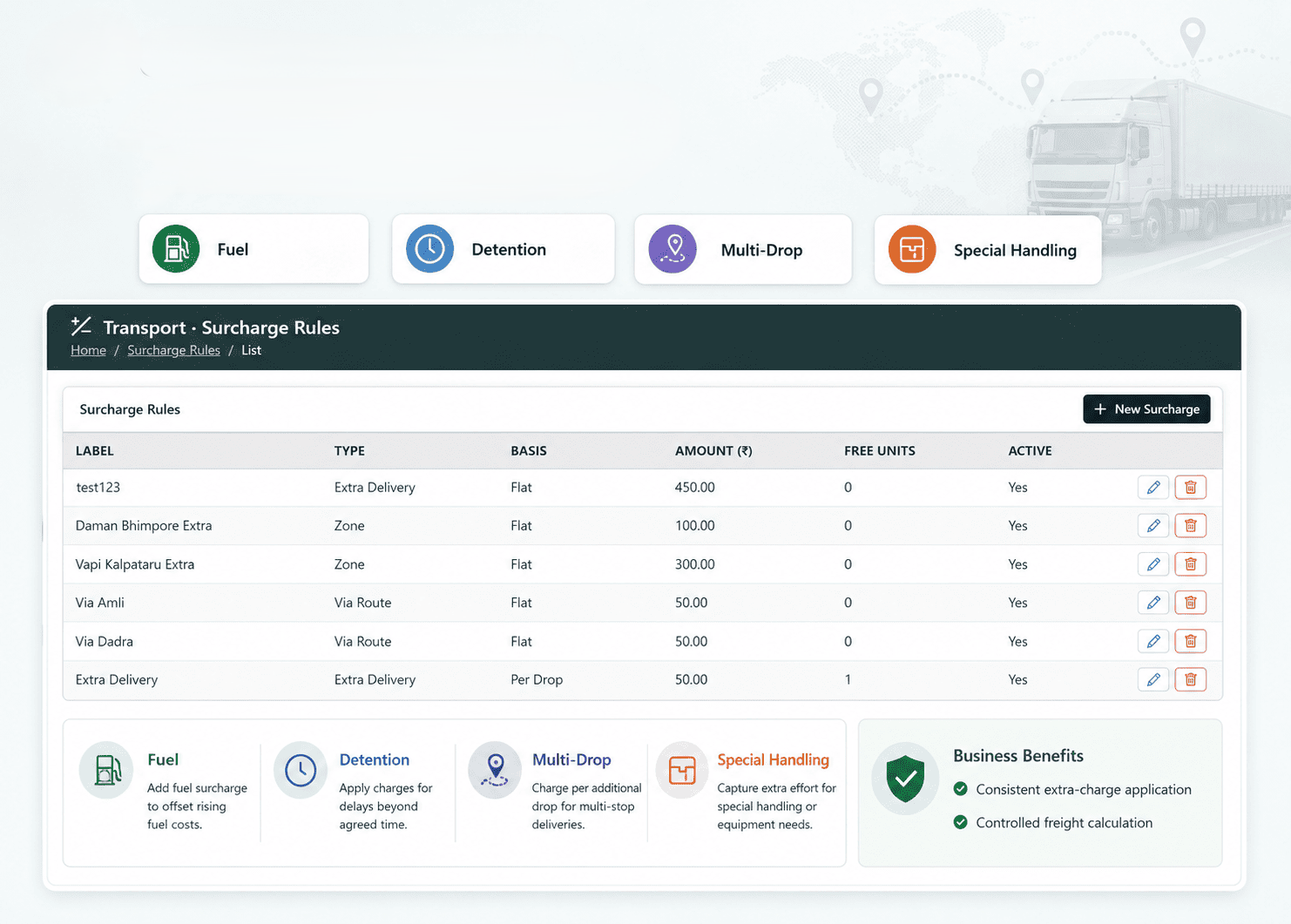
Surcharge Rules
Configure agreed additional freight charges such as fuel, detention, multi-drop or special handling charges.
These rules help the logistics team apply extra charges consistently while keeping freight calculation controlled through the ERP.
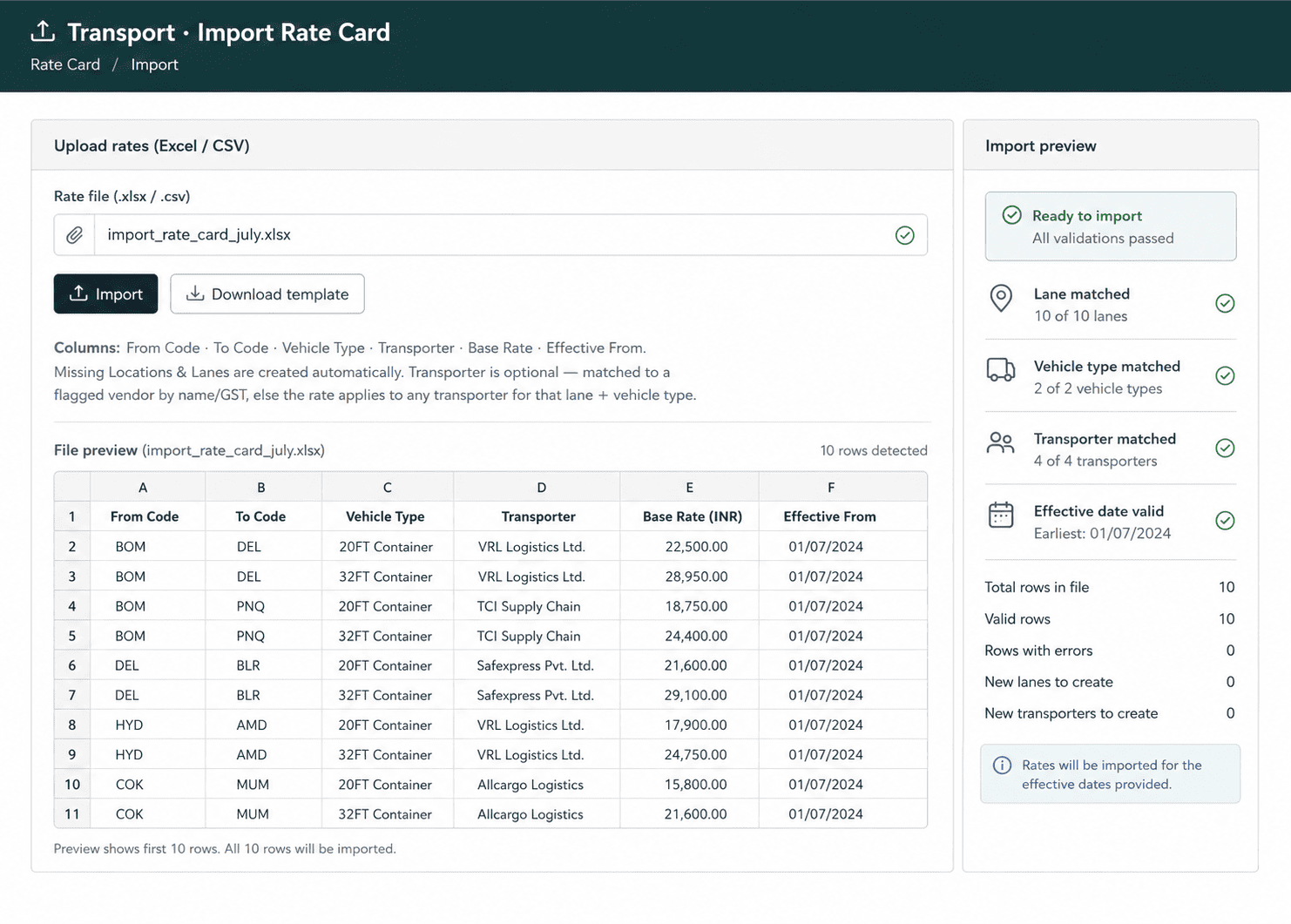
Excel Rate Import
Import existing transporter rate cards from Excel instead of recreating every contract manually.
This helps the team move current lane-wise, vehicle-wise and transporter-wise freight agreements into ERP faster, reducing setup effort and making TMS activation smoother.
Trip / Load Sheet
Combine multiple dispatches or invoices into one vehicle trip and review the complete vehicle movement before gate-out.
The load sheet keeps dispatch references, invoice details, vehicle planning and transporter information connected, helping the logistics team plan trips with better control.

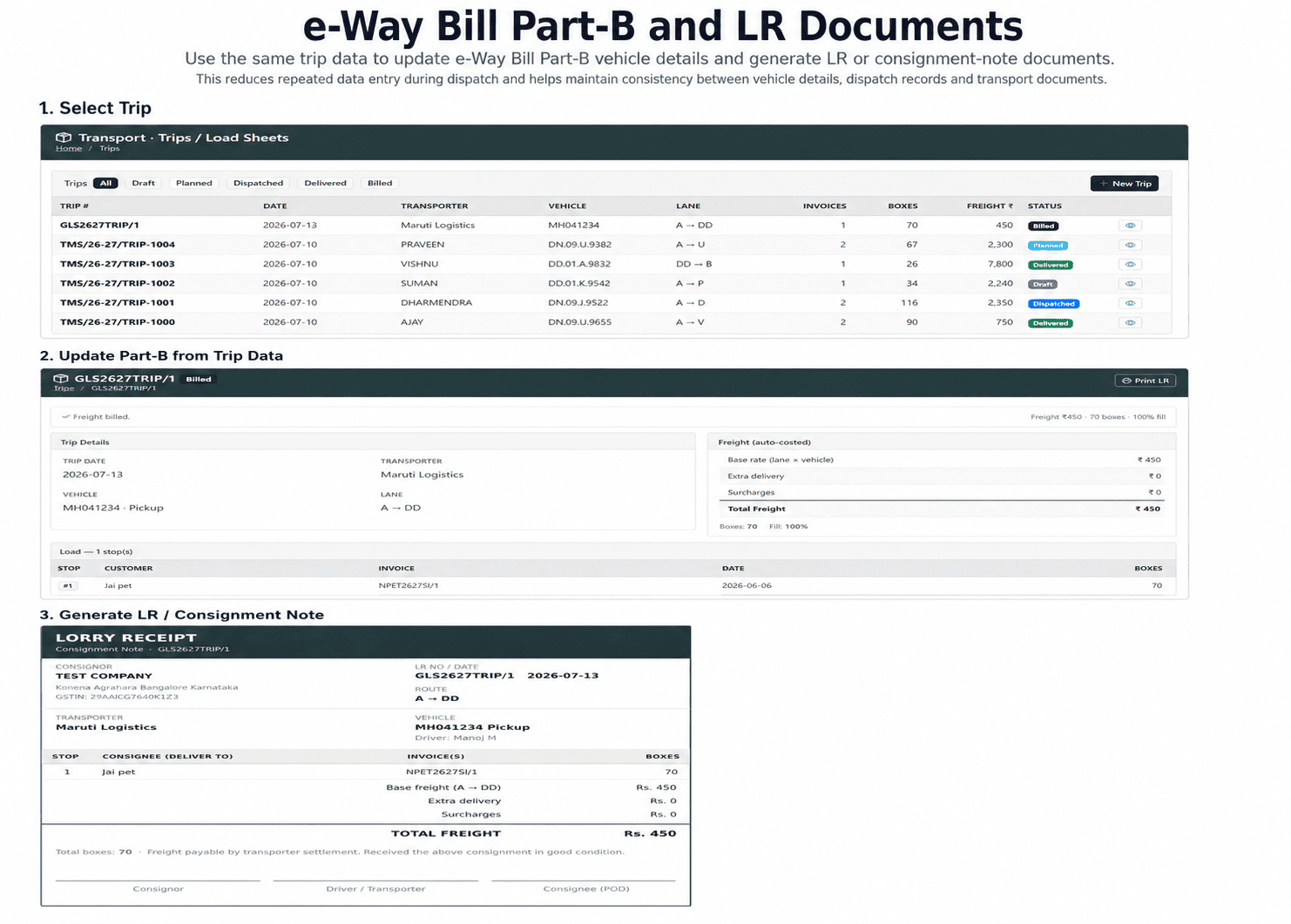
e-Way Bill Part-B and LR Documents
Use the same trip data to update e-Way Bill Part-B vehicle details and generate LR or consignment-note documents.
This reduces repeated data entry during dispatch and helps maintain consistency between vehicle details, dispatch records and transport documents.
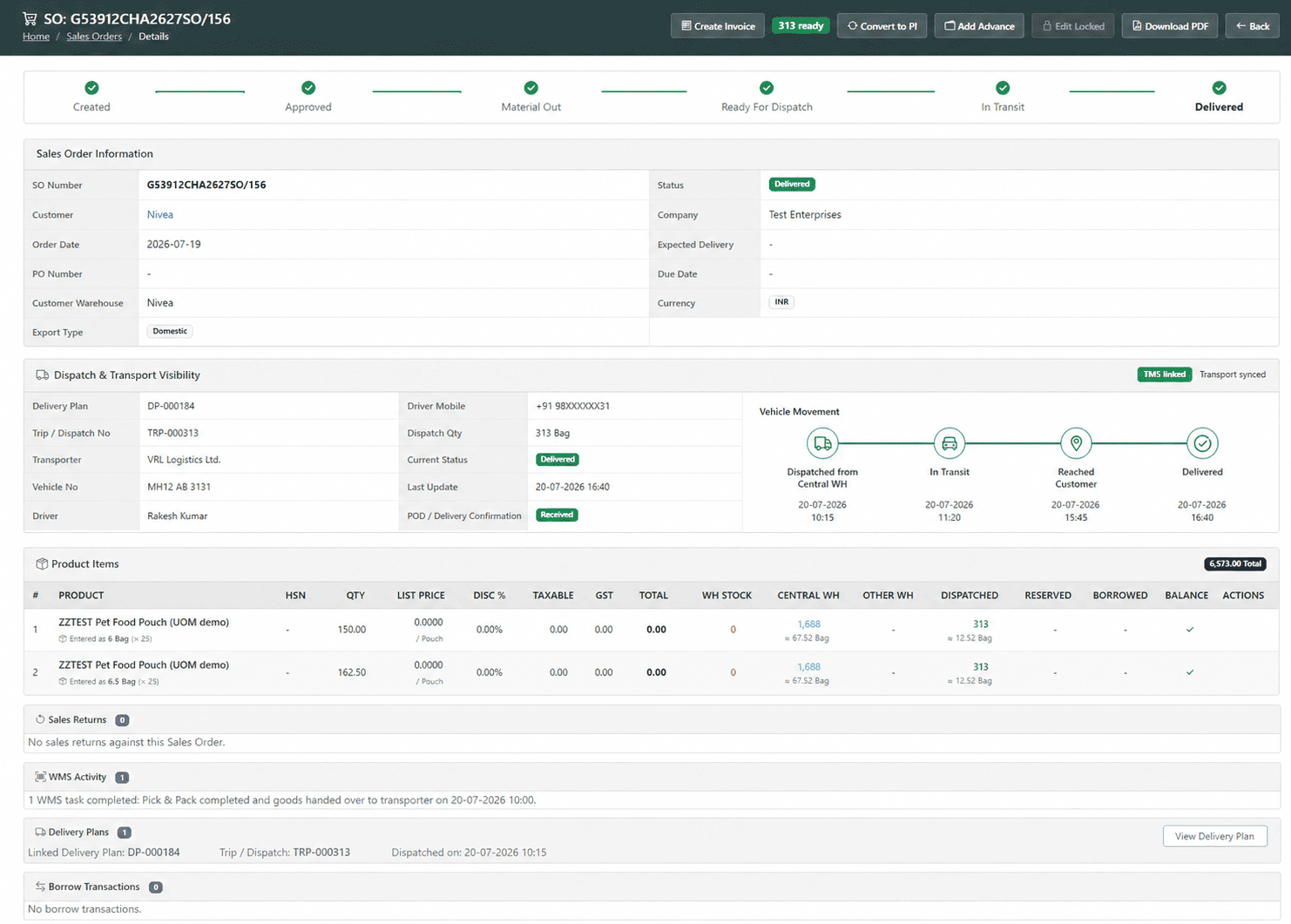
Sales Order Movement Visibility
Dispatch and transport status flow back to the sales order so sales, operations and logistics teams see the same movement status.
This reduces internal follow-ups and helps the team give better customer updates about vehicle movement, dispatch progress and delivery status.
Verify Delivery Before Approving Transporter Bills
Transport cost should be approved only after delivery is properly closed. T3 ERP TMS helps teams record POD, capture shortage or damage, compare transporter bills with ERP-calculated freight and maintain a clear audit trail.
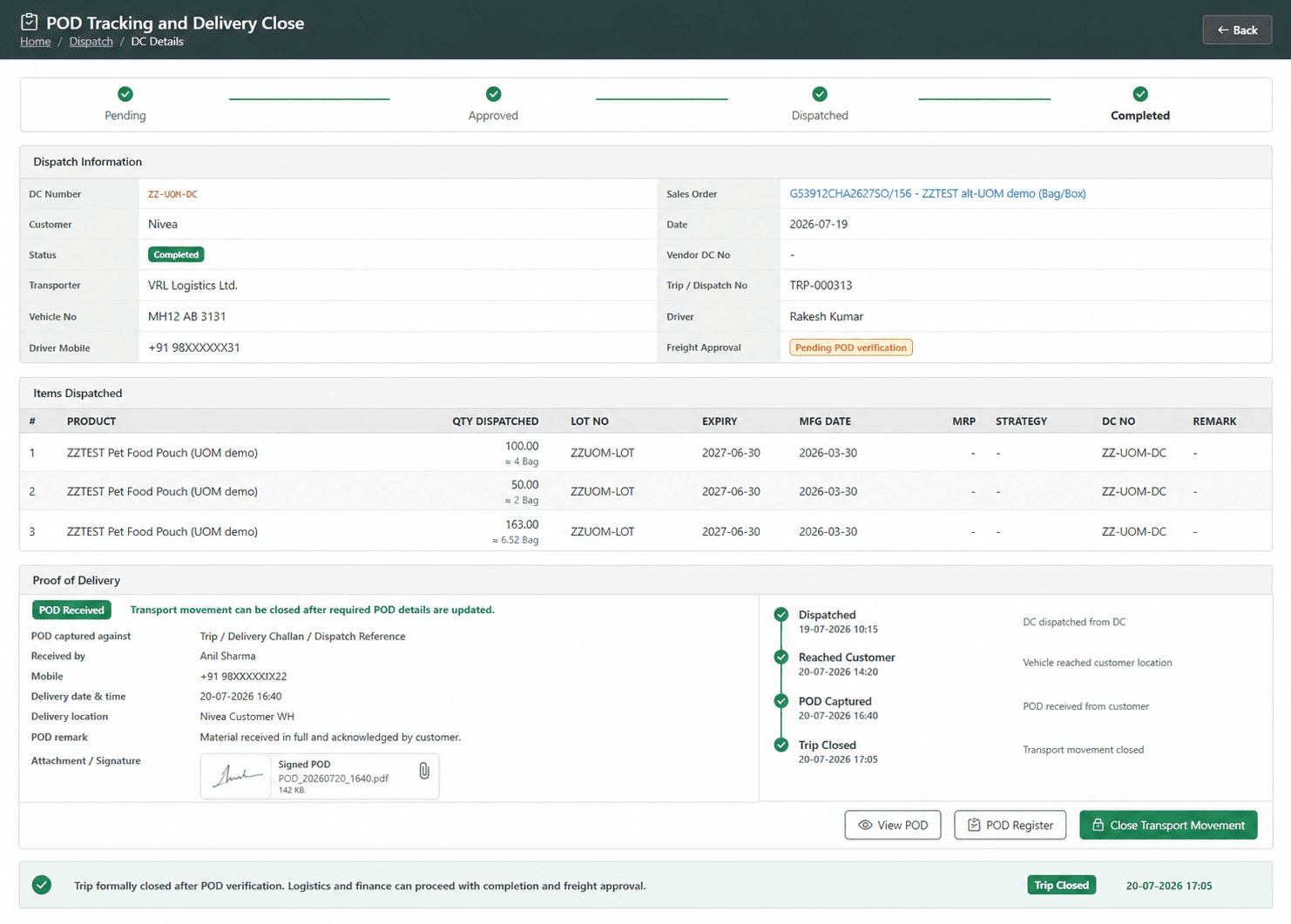
POD Tracking and Delivery Close
Attach or record proof of delivery against the trip, delivery challan or dispatch reference before closing the transport movement.
The trip can be formally closed only after required delivery details are updated, helping logistics and finance teams verify completion before freight approval.
Shortage and Damage Capture
Record short delivery, damaged quantity, remarks and delivery variance during trip closure.
This keeps claim-supporting details connected with the same trip record and helps the team review delivery issues before approving transporter bills.

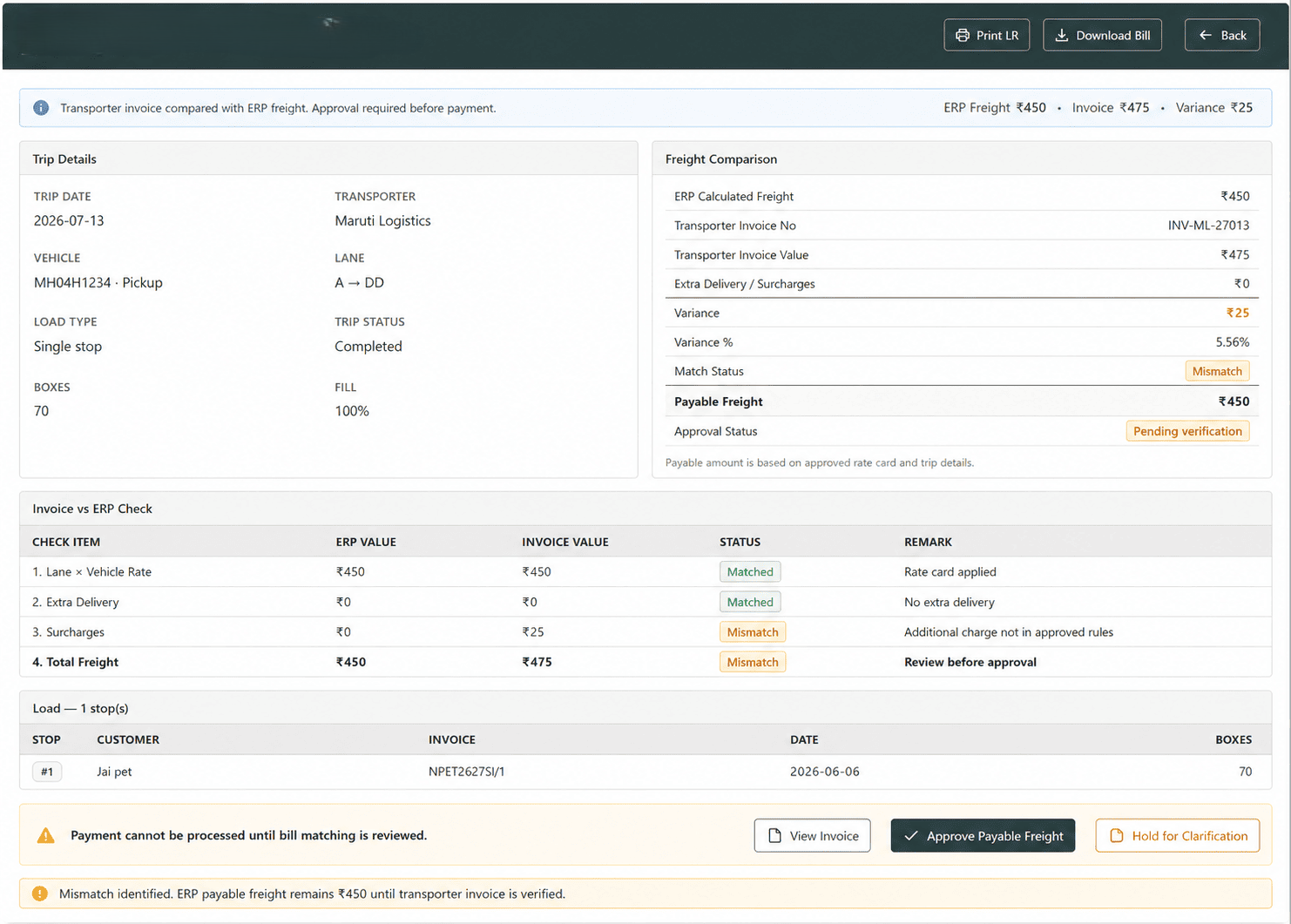
Transporter Bill Matching
Compare transporter invoice value with ERP-calculated freight before approval and payment processing.
This helps identify mismatch, reduce overbilling risk and make sure the payable freight amount is checked against the approved rate card and actual trip details.
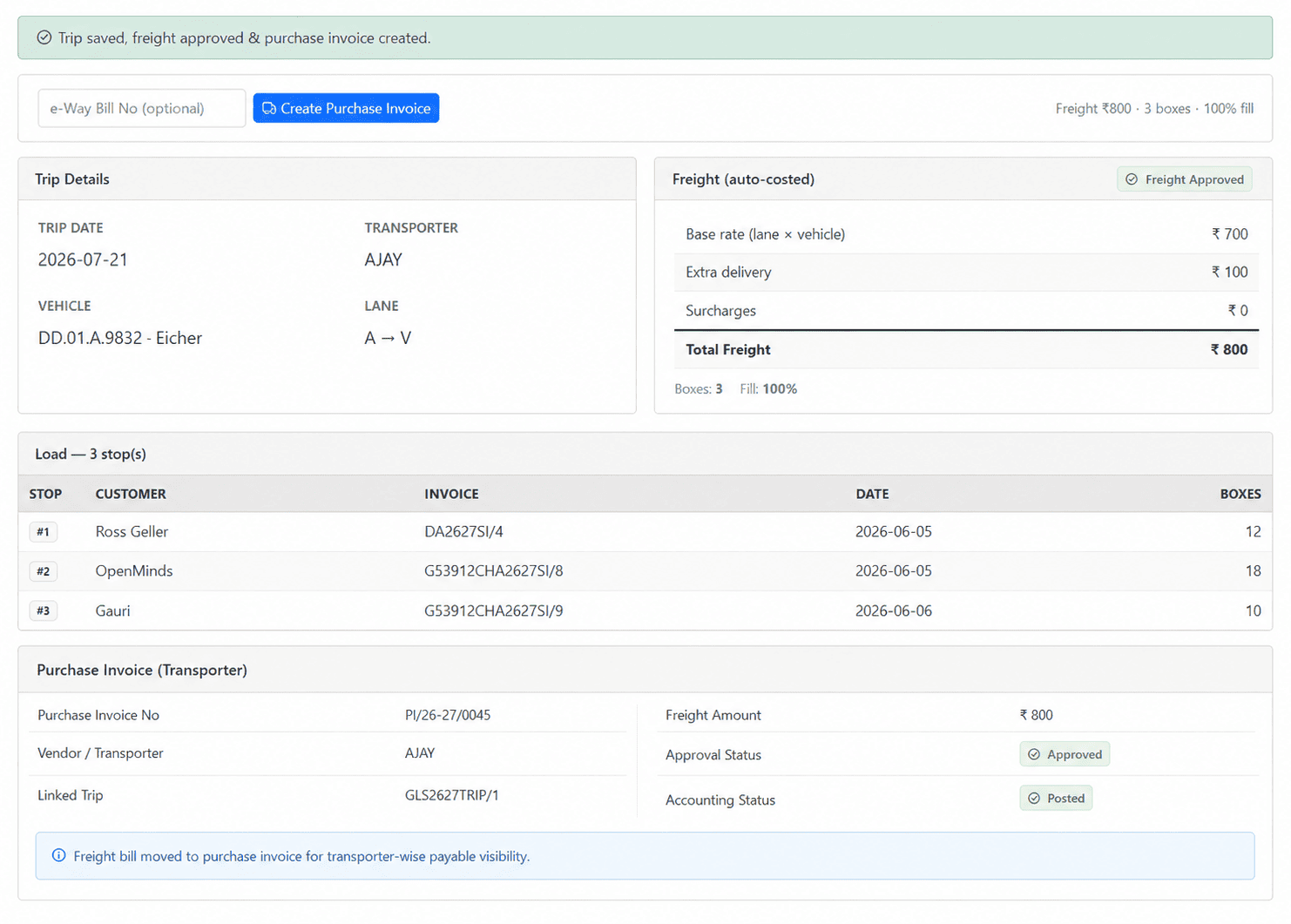
Purchase Invoice to Transporter
Create transporter freight bills as purchase invoices once the freight value is checked and approved.
Approved freight moves into accounting without maintaining a separate bill sheet, improving transporter-wise payable visibility.
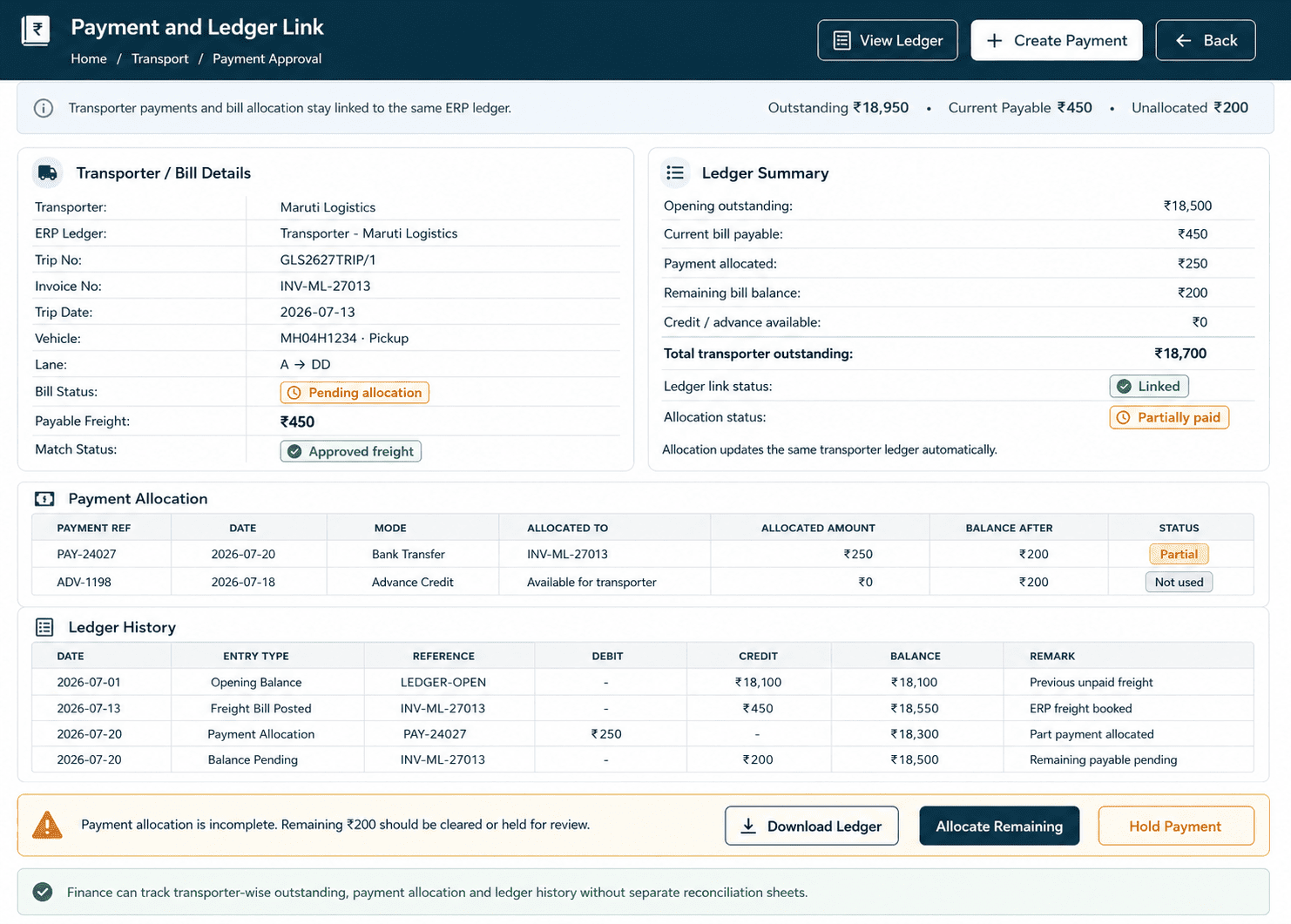
Payment and Ledger Link
Keep transporter payments and allocation connected with the same ERP ledger.
Finance teams can track transporter-wise outstanding, payment allocation and ledger history without depending on separate reconciliation sheets.
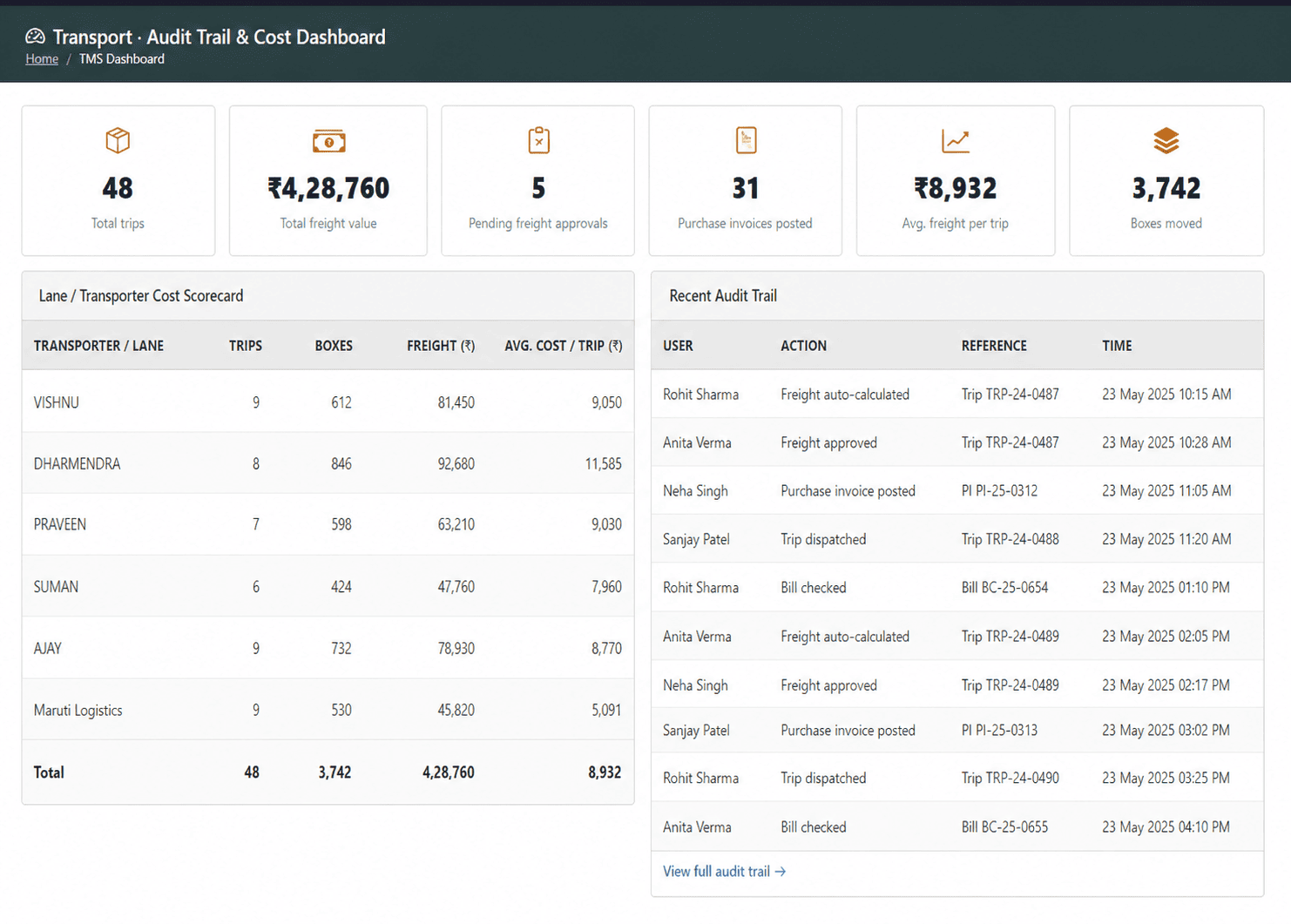
Audit Trail and Cost Dashboard
Track freight calculation, approval, bill posting and user-wise action history with a clear audit trail.
Dashboards help management review trip count, freight value, lane-wise cost, transporter performance and vehicle-type cost visibility without depending on manual reports.
Built for Indian Dispatch, Freight and Accounting Needs
T3 ERP TMS works inside the ERP instead of running as a separate transport tool. Transport data stays connected with sales orders, dispatches, purchase invoices and ledgers, so logistics, operations and finance teams work from the same transport record.
Transport Management System ERP FAQs
Clear answers about transporter rate cards, trip planning, e-Way Bill Part-B updates, LR generation, POD tracking, freight billing and ERP integration.
Have a transport-specific question?
Share your dispatch, freight billing, POD or transporter reconciliation workflow with our ERP team.
Talk to a Solution ConsultantDo I have to replace my current ERP?
No. TMS is a module of T3 ERP. If you already use T3 ERP, it can be enabled for your company. If not, it comes as part of the ERP platform with sales, purchase, inventory and finance.
Can I enable it for just one company or division?
Yes. TMS can be enabled company-wise, so you can start with one entity or division and expand later.
Does it handle both own vehicles and hired transporters?
Yes. Own vehicle and driver details can be maintained in masters, while hired transporter rate cards can be managed separately.
How is freight calculated?
Freight is calculated from the approved rate card using transporter, lane and vehicle type, with surcharge rules such as fuel, detention or multi-drop where required.
What does it do for the e-Way Bill?
During dispatch, TMS updates e-Way Bill Part-B vehicle details from the trip data, reducing repeated entry.
Can one truck carry many invoices?
Yes. A single trip can consolidate multiple invoices or dispatches into one vehicle movement.
Can we import our current rate cards?
Yes. Existing rate cards can be imported from Excel to reduce setup effort.
Will TMS affect inventory stock?
No. TMS handles freight and transport documentation only. It does not post stock movement on its own.

How can I help you?